conch

conch

Your phone, your server, your AI.

A native Android client that drives Claude Code, OpenAI Codex and Gemini CLI on the servers you already own. Nothing is hosted by us — your phone talks straight to your machine over SSH.

No ads · no accounts · no in-app purchases · free for personal and noncommercial use — you bring a server you can SSH into and your own agent account. Conch installs the rest itself.

how it works

There is no backend in the middle. Conch is a client for machines you already have, running agents you already pay for.

your phone

Conch. Chats, files, prompts, approvals — the tactile end of the loop.

→

plain SSH

One authenticated transport per host, multiplexed across every chat. Password, key file, or a FIDO2 hardware key.

→

your server

The real CLI process, in your real filesystem. Builds run, tests run, files land where you'd expect.

What you need to start: a server you can SSH into. That is the whole list — Conch sets the rest up itself.

1.  add the host           ip / user, and a password, key file or hardware key
2.  tap the agent          Conch installs Node and the CLI on the server for you
3.  sign in                the provider's login opens on your phone; the server
                          ends up logged in, its own terminal included

    then just type.

On a bare VPS step 2 needs root or sudo, since it is installing packages. If Node is already there it simply installs the CLI. You bring an Anthropic, OpenAI or Google account — that part is yours and stays yours.

what it looks like

Every chat is a live CLI process on your machine. Close the app, come back tomorrow, resume it.

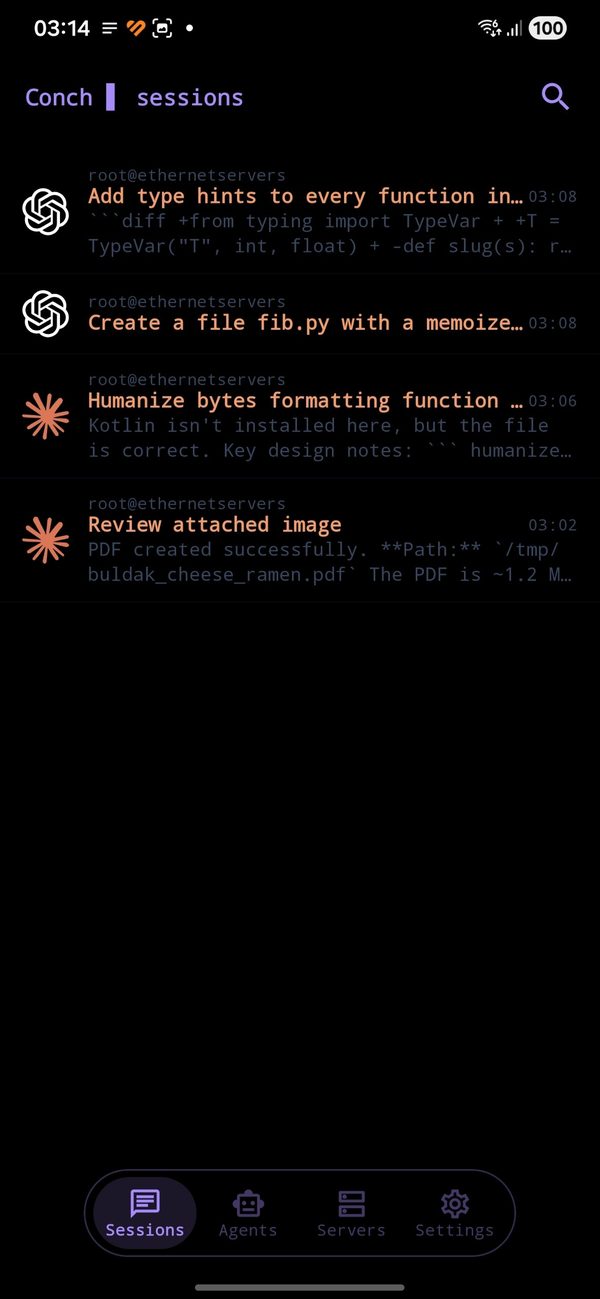
Session list across servers and agents
Every session from every server and agent, newest first — like a messenger.
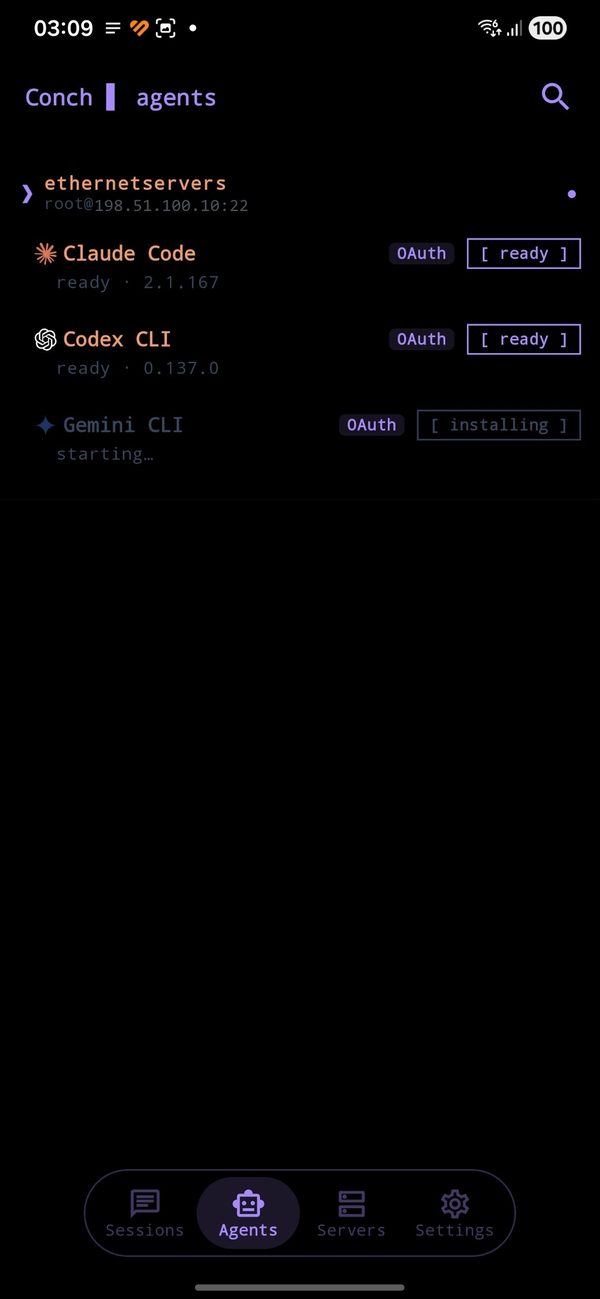
Agent status per server
Conch probes each host: which agents are installed, which version, whether they're signed in.
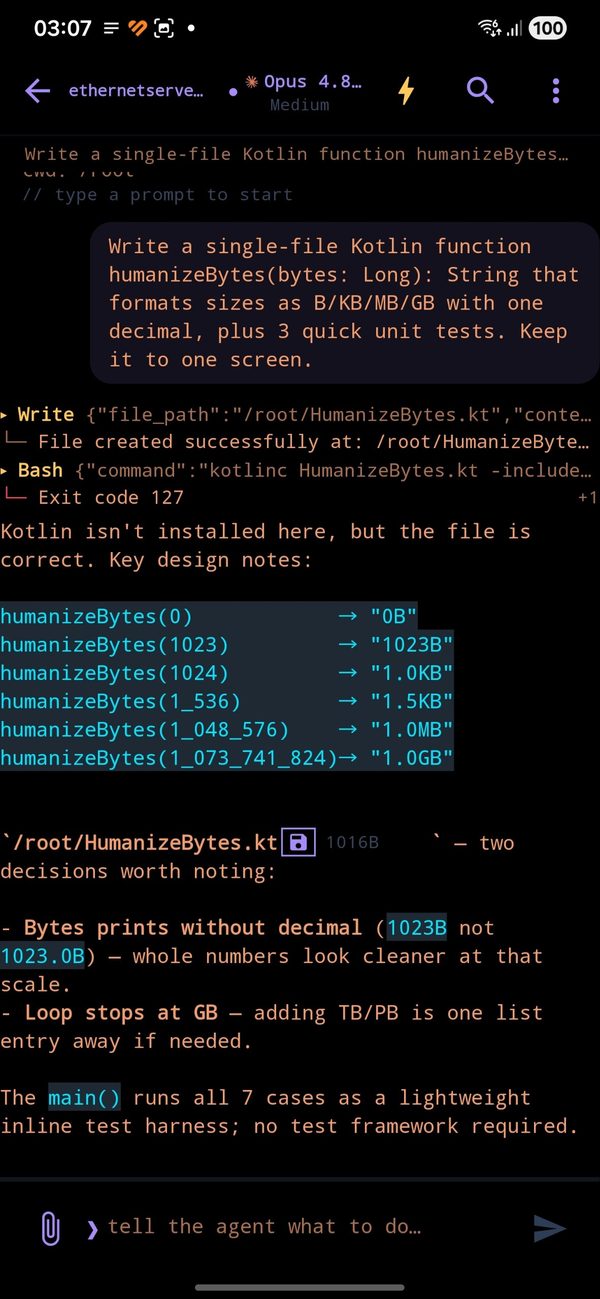
A chat with tool calls and a written file
Tool calls, exit codes and diffs render inline. Tap a file the agent wrote to pull it down.
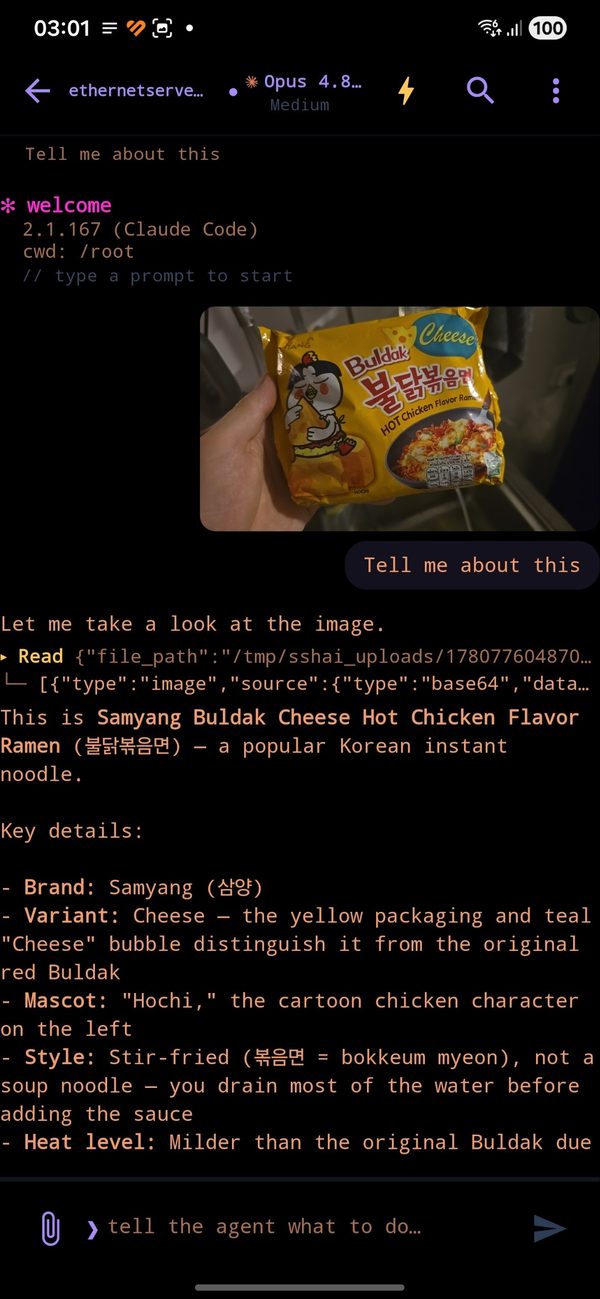
Attaching a photo to a chat
Attach a photo or a file from the phone; it streams over the same SSH channel.
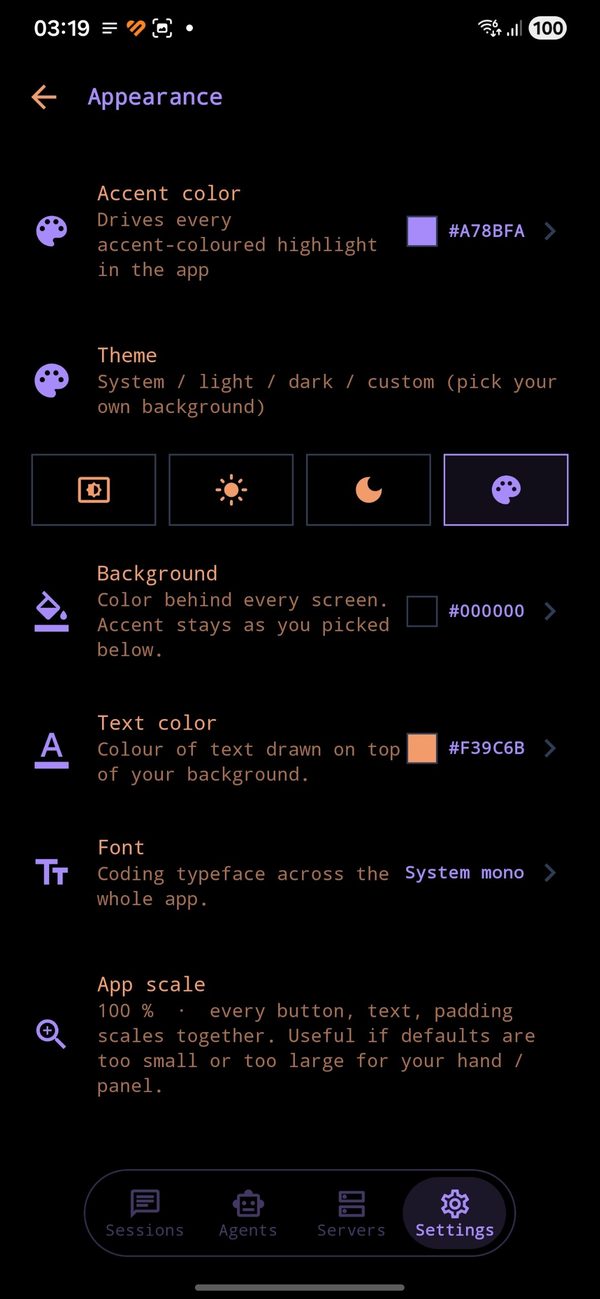
Appearance settings
Your accent, your background, your coding typeface, your scale.

what it does

Local models — on the device

A built-in model store that knows your device — it reads your RAM, chip and GPU and shows what will actually run, with real download counts and a speed estimate that self-calibrates on your hardware, plus live search across all of Hugging Face. One tap runs a model entirely offline through llama.cpp, and it drives the agent out of the box — the app gives each model the chat template it needs and routes it to the CLI that fits, so it runs shell commands and reads files with no per-model setup, only the brain local. Google Gemma, Qwen, Llama, gpt-oss and more, each wearing its own brand — tool-capable ones wear an agent badge, the rest are honest chat/vision models. The context window it runs them with follows your device rather than a fixed number, so a 4 GB phone gets a real shelf instead of an empty one — and nothing is offered that cannot start. Downloads are checked against the SHA‑256 their repository publishes, gated families work with your own Hugging Face token, and a .gguf you already own imports as a first-class model.

Talk to it. Out loud, if you like.

Tapping a downloaded model opens a chat with it inside the app — no developer options, no command line, no wireless debugging first. The chat shows what a local turn really costs: live CPU, RAM and heat where a cloud chat shows a quota, the window the engine actually granted, and the measured speed of the last answer. Dictation turns your voice into text on the phone — 99 languages, no Google speech service, and the recording is deleted the moment it becomes words. An optional search model makes the conversations on your phone searchable by meaning, across languages: ask in one and find the answer written in another, indexed only when you ask.

A model on your phone, for your other apps

Android does not isolate 127.0.0.1, so an inference port on a phone answers every app on it. Conch’s now needs a key — and another app can ask for one with a single intent, through a consent screen that names who is asking. You decide, every grant is listed with one tap to revoke, and what it gets is an OpenAI-compatible endpoint backed by a model running on your own hardware: no account, no quota, nothing leaving the device. A loaded model stays loaded behind a notification with one button to unload it, frees itself when idle, and starts gentler when the phone is already hot.

Your phone is a machine too

A real Linux runs on the phone itself and sits in the machine list like any server — Conch starts it the moment you open it, because there is nothing for you to connect to a device already in your hand. And an agent, local or on a server, can drive the phone at adb-shell level through a small helper Conch installs over your own SSH link: run commands, read logs, take a screenshot. Nothing leaves the device except to your own server. Once it is up it needs no network of any kind — drop Wi-Fi, go to mobile data, go to no data at all: the machine keeps running until the phone restarts.

Ten agents, one app

Claude Code, Codex CLI, Gemini CLI, Grok, Copilot CLI, Qwen Code, Cursor CLI, opencode, Crush and Continue — each driven through its own real flags, so resume ids, approval modes and model pickers are per-agent, not a lowest common denominator.

Sessions that survive

Chats are the CLI's own session files on your disk. Resume days later, from a different network, on a different phone.

Full-text search

Search across every session on every server by what was said, and jump to the message.

Hardware-key auth

FIDO2 / CTAP2 over USB-HID or NFC. Enrol as many keys per server as you like; one tap connects, and the same auth carries the whole session.

SAFE / AUTO / YOLO

One switch that maps onto each agent's own sandbox and permission flags, so you decide how much rope the model gets.

Memory editor

Edit CLAUDE.md / AGENTS.md / GEMINI.md — global and per-project — straight on the server.

Claude extras

Subagent browser and editor, plus your own ~/.claude/commands/*.md slash commands in autocomplete.

Built for one hand

Markdown rendering, copyable code blocks, mid-turn prompt queueing, a real Stop, and reconnect-on-network-change that doesn't need a tap.

what it does not do

The economics only work one way round: we are not in the path, so there is nothing for us to meter, store or sell.

Commercial licensing · Eight 24 Family LLC

for companies

Conch is published under the PolyForm Noncommercial 1.0.0 licence. Personal, hobby, research, education, charitable and government use is free and always will be.

Using Conch as part of a company's commercial engineering work falls outside that licence. If your developers are driving your build servers with it during paid work, the licence that covers you is a commercial one, and it is issued by Eight 24 Family LLC.

Nobody is going to be chased over this. It exists so that a company can put the tool in front of its legal team and get a clean answer instead of a shrug.

What a security review will find

No vendor in the data path

There is no Conch backend, no account system and no relay. Prompts, output, keys and files move between the handset and your own hosts over SSH. Nothing to allow-list, nothing to firewall, no third-party endpoint to justify.

No processor relationship to paper over

The app collects nothing — no analytics, no crash reporting, no telemetry, since 0.4.1 not even opt-out. We never receive your data, so there is no DPA to negotiate, no subprocessor list, and no data-residency question to answer.

Source-available, so nothing is taken on trust

A public source mirror carries every release, and each release ships a signed APK built from it. Your engineers can read what runs on their phones rather than believe a datasheet, and diff it release over release.

It fits controls you already run

It connects to your bastion or dev hosts the way any SSH client does, and authenticates with a password, a key file, or a FIDO2 hardware key over NFC or USB — so a hardware-key mandate is satisfied rather than worked around. No new identity provider to onboard.

Your agent spend stays yours

Conch drives the Claude Code, Codex or Gemini CLI on your servers — installing it there if it is missing — under your own accounts and quotas. We do not resell, meter or proxy model usage, and never see a prompt.

Nothing is retained if you walk away

Uninstalling, or the in-app delete all data control, removes every local store. Because nothing was ever sent anywhere, there is no export to request and no copy left behind on our side.

What we can talk about

What it costs

…

contact@eight24family.ai Eight 24 Family LLC. Tell us roughly how many developers and what they would be pointing it at, and we will come back with terms. The terms of service and privacy policy are published in full if your legal team wants to start there.

questions you're about to ask

Do I need my own server?

Yes, and that is the whole design — Conch is a client, not a service. You need a machine you can SSH into: a VPS, a home box, a work dev server.

You do not need to prepare it. Conch installs Node and the agent CLI on the server itself, and runs the provider sign-in from your phone so the server ends up authenticated — its own terminal included. A bare VPS needs root or sudo for that first install, because packages are being installed. What you bring is the machine and an Anthropic, OpenAI or Google account.

How is this different from driving Claude Code remotely from Anthropic?

Anthropic's own remote control is Claude-only, relays through their cloud, and the session lives on a machine of yours that has to stay awake with a terminal open. Conch drives three different CLIs, runs on an always-on server of your choosing with your laptop shut, and works with whatever account or API key that server already has — including hardware-key SSH auth. Different shape, and both can be true at once.

Is it a terminal emulator?

No. Termux owns that and does it well, and it is the better tool if what you want is a shell to live in. Conch gives an agent a good mobile surface instead — the approvals, files and diffs that a raw shell would make miserable to read on a 6-inch screen. It does run a real Linux on the phone, for local models and for the phone's own row in your machine list, but that is an environment it manages for the agent rather than a terminal for you.

What data does Conch collect?

None. Not "anonymised", not "opt-out" — there is no analytics, no crash reporting and no telemetry in the app, and no backend of ours for any of it to reach. The only network connections Conch opens are the SSH connections to servers you add yourself.

Up to 0.4.0 there was opt-out crash reporting through Sentry, which is why older store listings declared "approximate location" — Sentry derived a country from the request IP. It was removed outright in 0.4.1: SDK, Gradle plugin, init code and setting. The honest cost is that a crash on your device is now invisible to us, so bug reports by email are the only channel. Full detail in the privacy policy.

Is it free? What's the catch?

For you, almost certainly yes: personal, hobby, research, education, charitable and government use is free under the PolyForm Noncommercial licence, with no ads and no in-app purchases. It started as one developer's own tool and is published because it may as well be useful to someone else.

The one exception is a company using it for commercial work, which is what a commercial licence covers. That is the business model, such as it is — and it is why the free version has no ads to sell and no data to collect.

Is the source available?

Yes — a source mirror lives at github.com/nikitaeight24family/Conch, under PolyForm Noncommercial 1.0.0, along with signed APKs for every release if you'd rather sideload than install from Play. Source-available, not OSI open source — the difference is exactly the commercial clause.

Which Android versions?

Android 8.0 and up. Hardware security keys need a device with USB-OTG or NFC.